
When professionals set up their LinkedIn profile, they spend time on their headline, their summary, and their experience. They craft their words carefully.
Then they upload a photo, shrink it down so it fits neatly in the little circle, and move on.
That might be costing them more than they know.
Here is something LinkedIn never tells you: every time you post an update, write a comment, or send a direct message, your profile photo appears right next to your name. It is the first visual impression you make — not your headline, not your credentials, not your content.
And if your face is barely visible in that circle, you are already starting the conversation at a disadvantage.
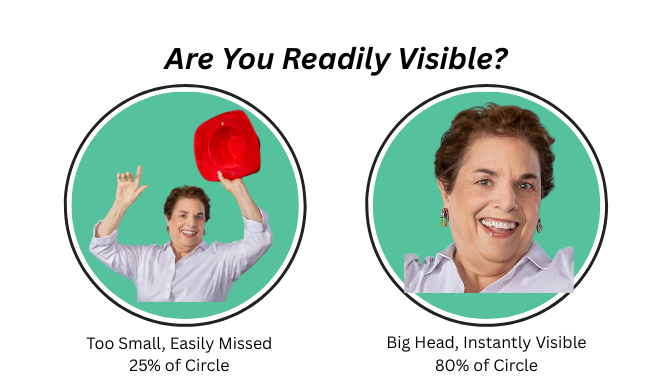
I recently noticed a pattern while scrolling through my LinkedIn feed. Some profiles felt warm and inviting. Others felt distant. The content was often similar. The credentials were comparable. But when I looked more closely, the difference was almost always the same: the people who felt approachable had faces that filled their profile circle. Their eyes were clear. Their expressions were readable. I felt like I was looking at a person.
The others had chosen photos where they were standing at a distance, or posed in a group, or framed so far back that their head occupied maybe 20 or 30 percent of the available space. They were technically present, but they were not really visible.
On LinkedIn, invisible is expensive.
Think about how your photo functions across the platform. It appears next to every comment you leave in a group discussion. It sits beside every message you send to a new connection. It anchors every post you share. That tiny circle is working constantly, either building recognition or missing the opportunity entirely.
The fix is simple. Crop your photo so that your head fills approximately 80 percent of the circle. Your face — particularly your eyes — should be clearly visible without zooming in. You do not need a professional photographer for this. You need a good crop.
I heard this concept from Michael Weiss who called it the “big head” rule, and it is one of the easiest, highest-impact adjustments you can make to your LinkedIn presence today.
Here is why it matters beyond aesthetics. People do business with people they trust. Trust begins with familiarity. And familiarity on a digital platform begins with being seen, really seen. When your face is clear and your expression is readable, viewers feel a subtle but real sense of connection before they have read a single word you wrote.
When your face is small and distant, that connection never has a chance to form.
Every Thursday, Darleen Petrie and I host a pop-up livestream called “What LinkedIn Doesn’t Tell You.” Today, we are talking about exactly this, the one profile detail that follows you everywhere and why most people are getting it wrong.
Tune in, and bring your questions.
Relationship Builder
One of the most overlooked forms of trust-building is simply being recognizable.
Think about how relationships develop at in-person events. You meet someone, you see their face, and over time that face becomes familiar. Each time you run into them, the familiarity deepens. Eventually, you feel comfortable enough to have a real conversation.
LinkedIn works the same way — except the medium is digital and the “face” is a small circle.
Every time someone sees your comment, your post, or your message, they see your photo. If your face is clear, each impression adds to a growing sense of familiarity. They may not be ready to reach out yet, but they are registering you. You are becoming someone they recognize.
That recognition is the foundation of every relationship that eventually becomes a client conversation.
The C2C Tweak
This week, pull up your LinkedIn profile and look at your photo with fresh eyes.
Open your profile on both desktop and mobile. Check whether your face is clearly visible in the circle — not just recognizable to someone who already knows you, but clear to a stranger seeing you for the first time.
Ask yourself:
- Can someone see my eyes clearly?
- Does my head fill at least 70 to 80 percent of the circle?
- Would a stranger feel a sense of connection, or would they see mostly background and space?
If your answer to any of these is “not really,” update your photo. Use a cropping tool, a phone camera app, or LinkedIn’s own editing feature to zoom in on your face.
You do not need a new photo. You may simply need a better crop of the one you already have.
Make the adjustment today. Then tune into the livestream with Darleen and me this Thursday around noon Eastern time to hear more tips that LinkedIn never broadcasts.
Let’s Talk
If you want to know what else your LinkedIn profile may be doing — or not doing — on your behalf, join Darleen Petrie and me this Thursday at noon for our pop-up livestream, “What LinkedIn Doesn’t Tell You.”
Each week we share one insight that most professionals overlook entirely.
This week: the Big Head.
Tune in for the tips.
To your business success,
Nancy Zare, Ph.D., Sales with Soul
Helping Experts Become Confident Business Owners